
Data Engineering System Design: Orchestration + Apache Airflow
Orchestration system design problems and how to solve them with Airflow. Insights and lessons you can apply to your jobs and interviews.

I invite you to join my paid membership to read this article and over 180 other high-quality data engineering articles, with a limited-time 50% discount on the annual plan:
The discount will end on April 16th—only 2 days left since the release of this article. Come and grab it!
Intro
You might have heard of system design.
It is the process of selecting software components (by evaluating the trade-offs) and gluing them together (in a suitable way) to achieve the desired functionality.
That’s the broad definition for software engineering.
Zoom into the data engineering field.
System design is also about selecting and gluing, but the focus is more on the reliability, trustworthiness, and scalability of the data. You have to choose the right techniques, frameworks, file formats, or storage optimizations for ingesting, storing, and serving data.
An important difference between data engineering and software engineering is that, unlike software, data must be moved through multiple stages, from object storage to different layers of the data warehouse. The journey requires an orchestration layer that … orchestrates the whole movement. It’s not only a cron scheduler or a task execution engine, but also the actor that enables integration between stations, ensures fault tolerance, and provides backfilling capability.
In this article, we take a closer look at one of the most important aspects in data engineering system design: the orchestration. I will discuss a set of orchestration problems. Those are:
Scheduling
(Task) Dependency Management
Branching
Deal with failures
Backfilling
Concurrency & Resource Control
Resource isolation
Observability
Then we bring in Airflow, the most used orchestration platform at the moment, to see how Airflow could help us solve those problems. We revisit Airflow first, then discuss each problem and see how Airflow could fit into the picture. The goal of the article is to make you and me aware of orchestration problems and how we can solve them with Airflow, so we can be confident in our daily tasks or system design interviews (for data engineers).
Note 1: You won’t see any concrete use cases or scenarios, as I try to discuss these problems as “patterns” so you can apply them based on your needs.
Note 2: Insights I delivered in this article are based on my personal experiences. If you see I miss anything, feel free to provide feedback.
Note 3: I reference the latest Airflow documentation to demonstrate Airflow’s capability. If you’re using an older version of Airflow, you might find some concepts/features not available.
Note 4: I assume you have some getting-started experience with Airflow: if you can write a simple DAG with a few tasks, you’re good to go.
Airflow revisit
Apache Airflow was created in 2014 at Airbnb, when the company was dealing with massive, increasingly complex data workflows. At the time, existing orchestration tools were either too rigid or lacked scalability. To address this challenge, Maxime Beauchemin, a data engineer at Airbnb, spearheaded the creation of Airflow.
At its core, Airflow operates on the concept of Directed Acyclic Graphs (DAGs) to model workflows. It is essentially a roadmap for the workflow and contains two main components:
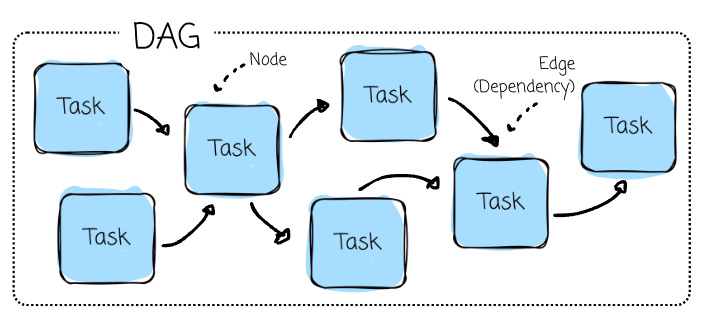
Tasks (Nodes) are individual work units, such as running a query, copying data, executing a script, or calling an API.
Dependencies (Edges): The relationships between tasks that define their execution order (e.g., preprocessing is executed only after retrieving data from a third-party API).
Airflow ensures tasks are executed according to their dependencies, automatically manages retries on failure (based on their retry configuration), and thoroughly logs task execution for monitoring and debugging.
The orchestration platform comprises several components:
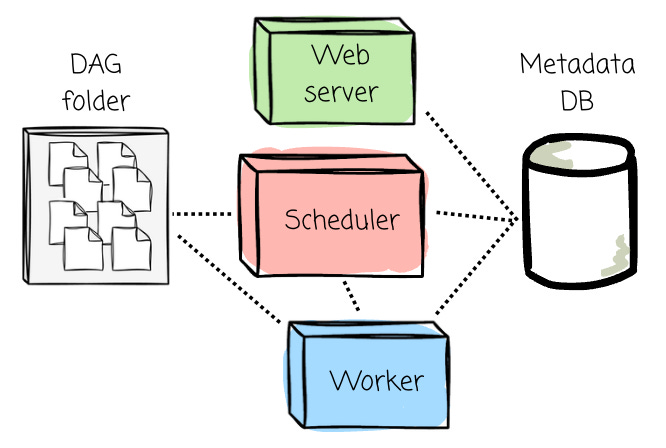
Scheduler: The component responsible for parsing DAG files, scheduling tasks, and queuing them for execution based on their dependencies and schedules. The executor logic runs inside the scheduler.
Web Server provides the Airflow UI, allowing users to visualize workflows, monitor task execution, inspect logs, and trigger DAG runs.
Metadata Database: A central database that stores all metadata, including DAG definitions, task states, execution logs, and schedules. It’s essential for tracking workflow history.
DAG folder: It contains DAG files defined by users.
Workers: Components that execute the tasks assigned by the executor.
The workflow between Airflow’s components can be broken down into the following steps:
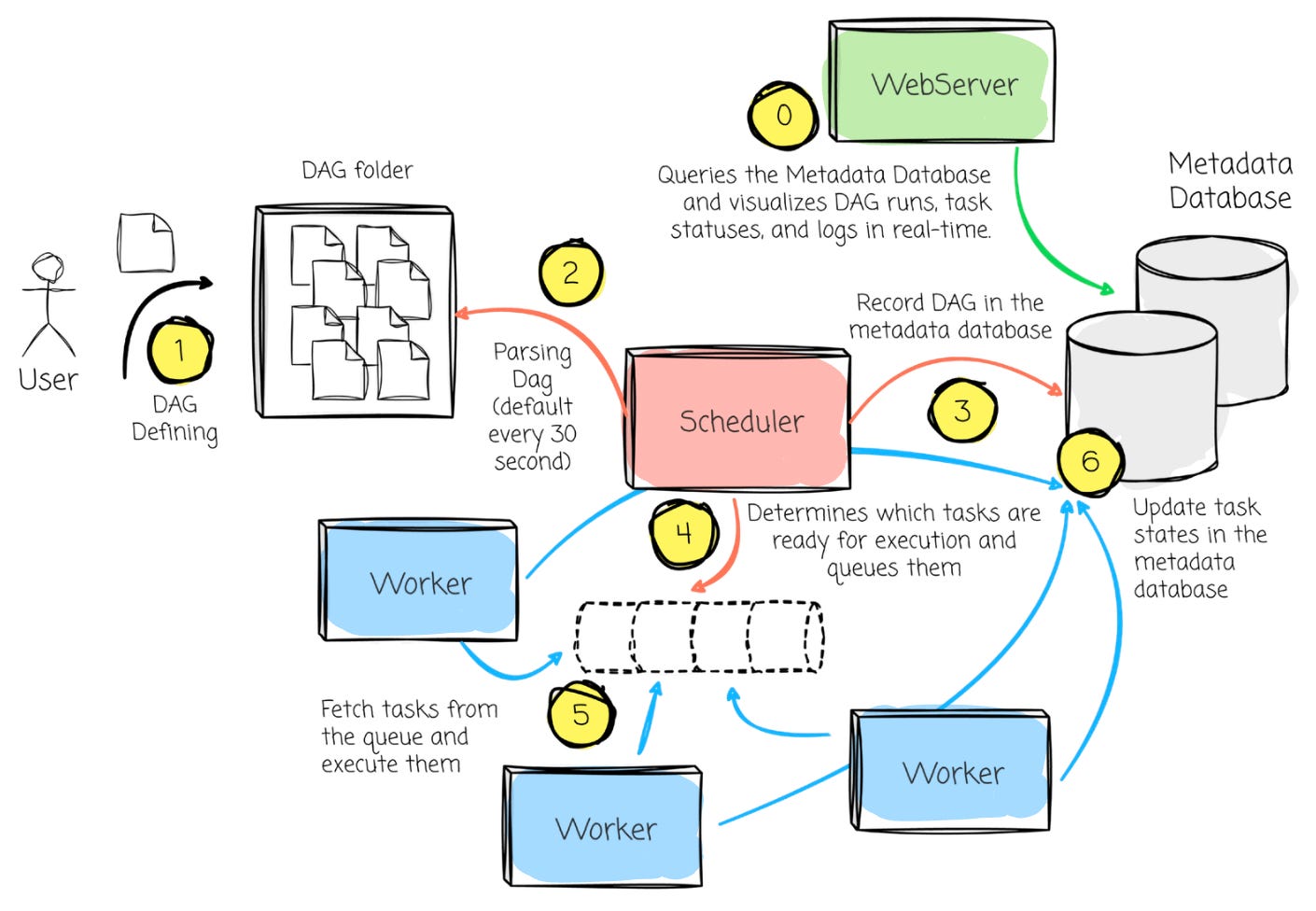
DAG definition: The users define the Python DAG file in the DAG directory.
DAG Parsing: The Scheduler scans the DAG directory, parses the DAG file, and loads it into the Metadata Database.
Scheduling: Based on the DAG definitions and schedule intervals, the Scheduler determines which tasks are ready for execution and queues them.
Task Execution: The Executor fetches the queued tasks and assigns them to available Workers. The Workers execute the tasks, and task states are updated in the Metadata Database.
Monitoring: The Web Server queries the Metadata Database and visualizes DAG runs, task statuses, and logs in real-time. Users can monitor task progress, inspect logs, or trigger manual DAG runs from the UI.
Retries and State Updates: If a task fails, the Scheduler ensures retries are handled according to the task’s retry configuration. The Executor updates task states in the database until all tasks are either completed successfully or fail after retry limits are reached.
Orchestration problems
Your orchestration toolkit could be simply a Python script, a cron expression, and a VM at first.
Then someone asked if we could:
Run a second script after the first one finishes.
Have another that depended on both.
Re-execute the runs from last week to apply the bug fixes.
Retry if tasks failed, but still respect the dependencies between them.
Have a notification, a log, or a kind of UI to observe the flow.
Onboard more scripts to deal with more data sources
Run the flow based on an external event instead of a fixed scheduler.
That’s when you have orchestration problems. I’ve been there more than once. Every time, the same concerns show up: scheduling, retries, dependencies, backfills, resource management, and observability.
In the rest of the article, I will discuss common orchestration problems (based on my personal observations) and explore how Airflow could solve them.
We start with the most obvious one: scheduling.
I invite you to join my paid membership to read this article and over 180 other high-quality data engineering articles, with a limited-time 50% discount on the annual plan:
The discount will end on April 16th—only 2 days left since the release of this article. Come and grab it!
