
(2/2) I analyzed the pricing models of 5 famous cloud data warehouses so you don't have to.
Part 2: Databricks, Snowflake, and the practices for keeping your data warehouse costs under control
I invite you to join my paid membership list to read this writing and 150+ high-quality data engineering articles:
If that price isn’t affordable for you, check this 30% ANNUAL DISCOUNT
If you’re a student with an education email, use this 50% ANNUAL DISCOUNT
You can also claim this post for free (one post only).
Intro
This is the second part of my analysis on the pricing models of the 5 famous cloud data warehouses. You can read the first part, which discusses the pricing models for Microsoft Fabric, AWS Redshift, and Google BigQuery, here.
In this article, I will discuss Snowflake or Databricks, along with my general best practices for keeping your data warehouse costs under control.
Note 1: This article won’t debate which solution is cheaper, as costs depend on many factors that vary by your organization's context and requirements. Instead, my purpose is to give you guys a simplified view of the pricing models for cloud data warehouses, which can sometimes be hard to understand at first glance. Also, feel free to correct me if you see anything wrong.
Note 2: This article focuses on the scenarios when you store your data directly in the cloud data warehouse's proprietary storage. Plus, in each warehouse, I only cover the compute and storage cost.
Databricks
Compute
In Databricks, compute costs are unique in that the vendor bills you on two separate invoices: the first is for software, and the second is for hardware.
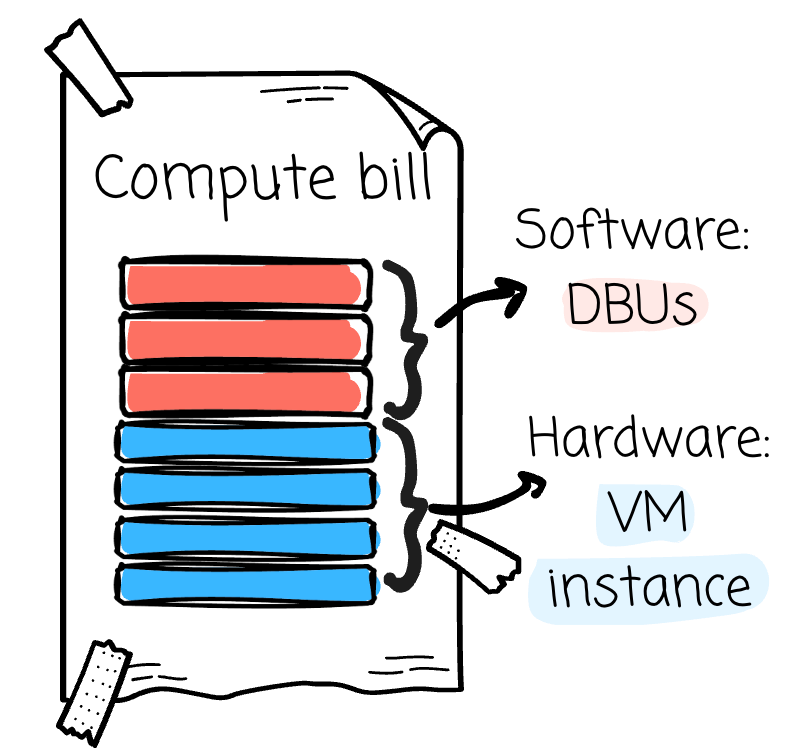
For software, Databricks introduces the concept of DBU, the unit of processing power. Your software billing is calculated around this unit:
The number of consumed DBUs * The rate of a DBUEach operand varies based on different factors.
First, the number of consumed DBUs depends on:
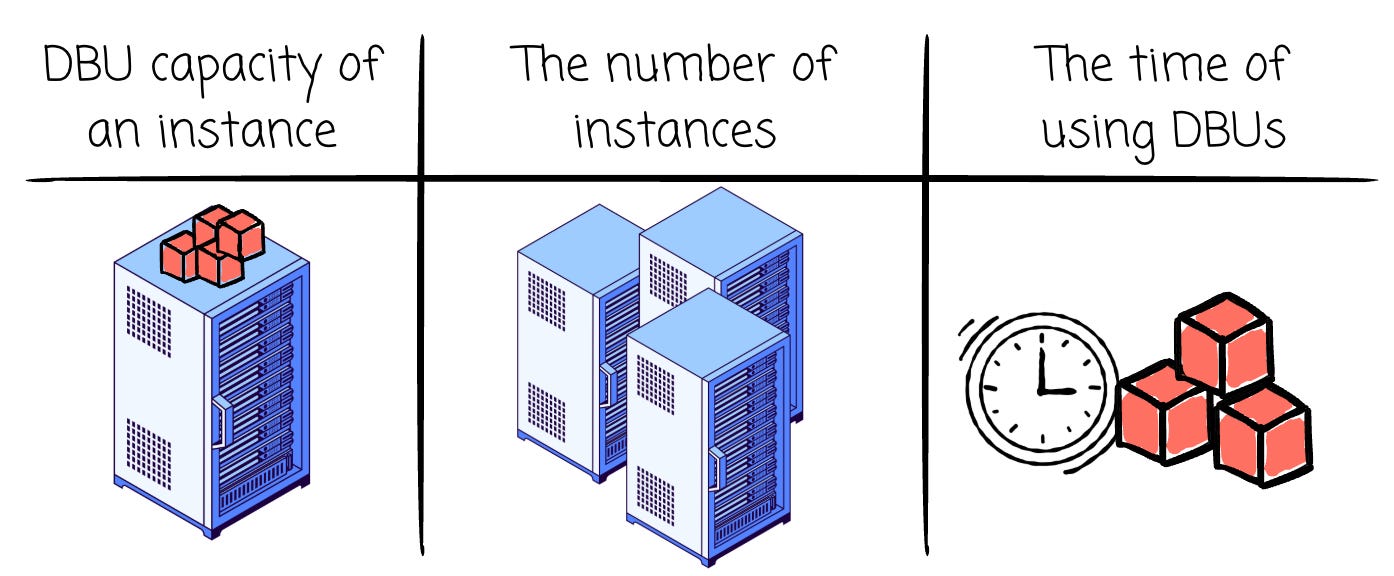
The DBU capacity of an instance: Each instance has a different limit of DBUs that can run per hour.
The number of instances: for example, 4 or 5 instances
Note: The organization can configure it to use a spot instance to reduce costs. Cloud providers offer these instances at large discounts (up to 90% off). In return, spot instances can be revoked from cloud providers at any time. This approach is suitable if your use cases can tolerate a few minutes’ lag due to the removal of spot instances (which are later replaced by the on-demand instances)
The time of using DBUs (billed on a per-second usage, minimum 60 seconds): for example, 8 hours
Note: the time required to use DBUs might fluctuate depending on the organization's setup.
Cluster termination policy: tearing down your Databricks cluster after some idle time.
Auto Scaling policy: cluster’s min and max number of workers.
Number of DBUs quota that a single cluster can consume
Second, the rate of a DBU depends on:
Cloud Provider: The DBU rate might be different on AWS, GCP, and Azure.
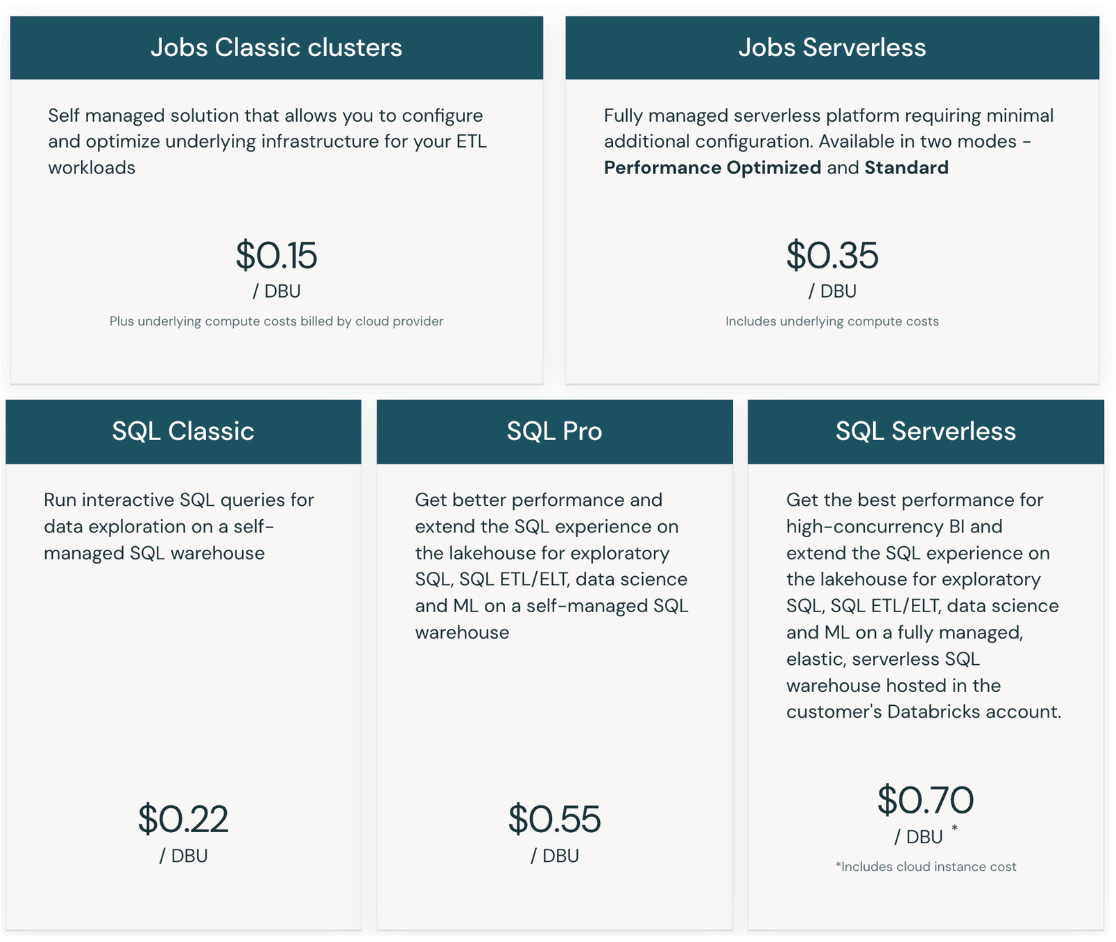
Workload: Different workloads, such as SQL, Lakeflow, or Model service, will have different DBU rates. For some workloads, Databricks offers serverless options in addition to the original one when you need to manage your instances. Serverless offers usually have a higher DBU rate (as Databricks manages everything for you)
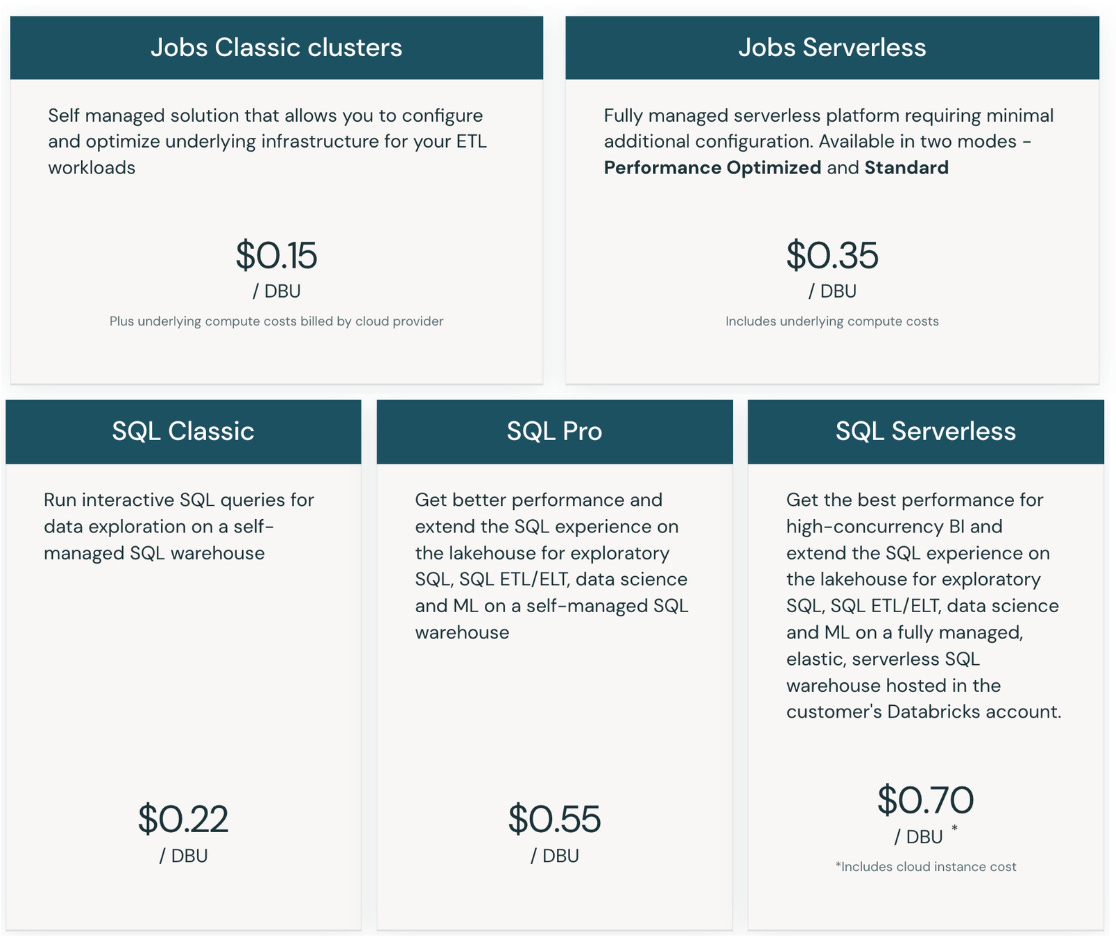
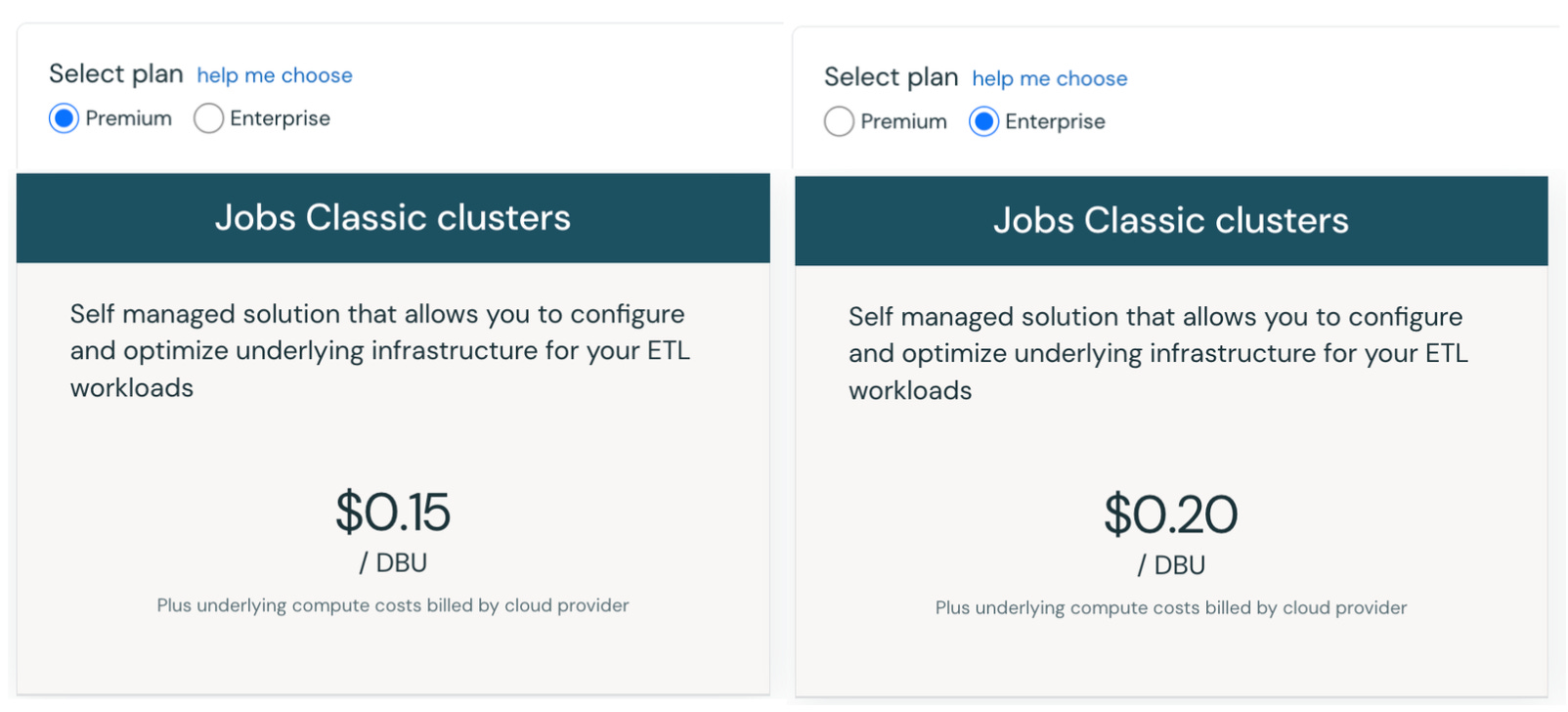
Different workloads have different DBU rates. Source. Plan: Databricks offers Premium and Enterprise plans (AWS has both, while GCP has only Premium). Enterprise offers stricter governance, compliance, and networking required by highly regulated industries. The Enterprise plan has a higher DBU rate for some workloads.
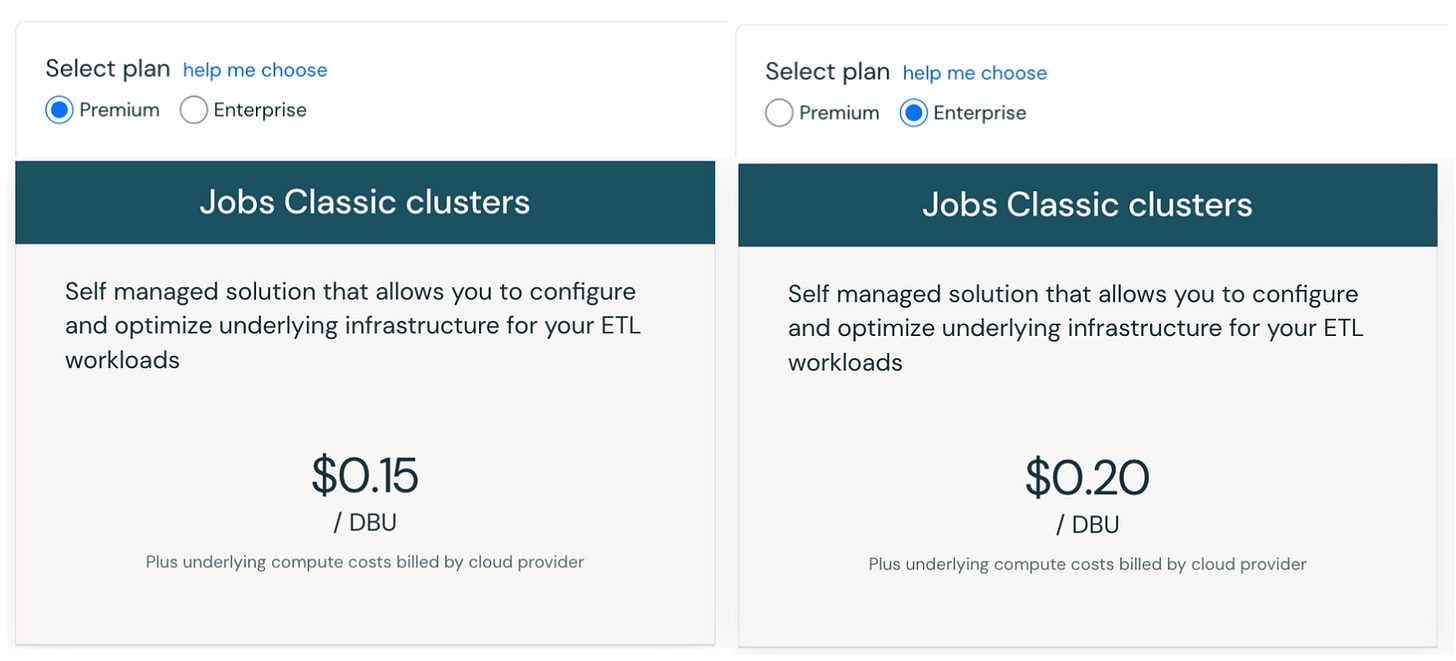
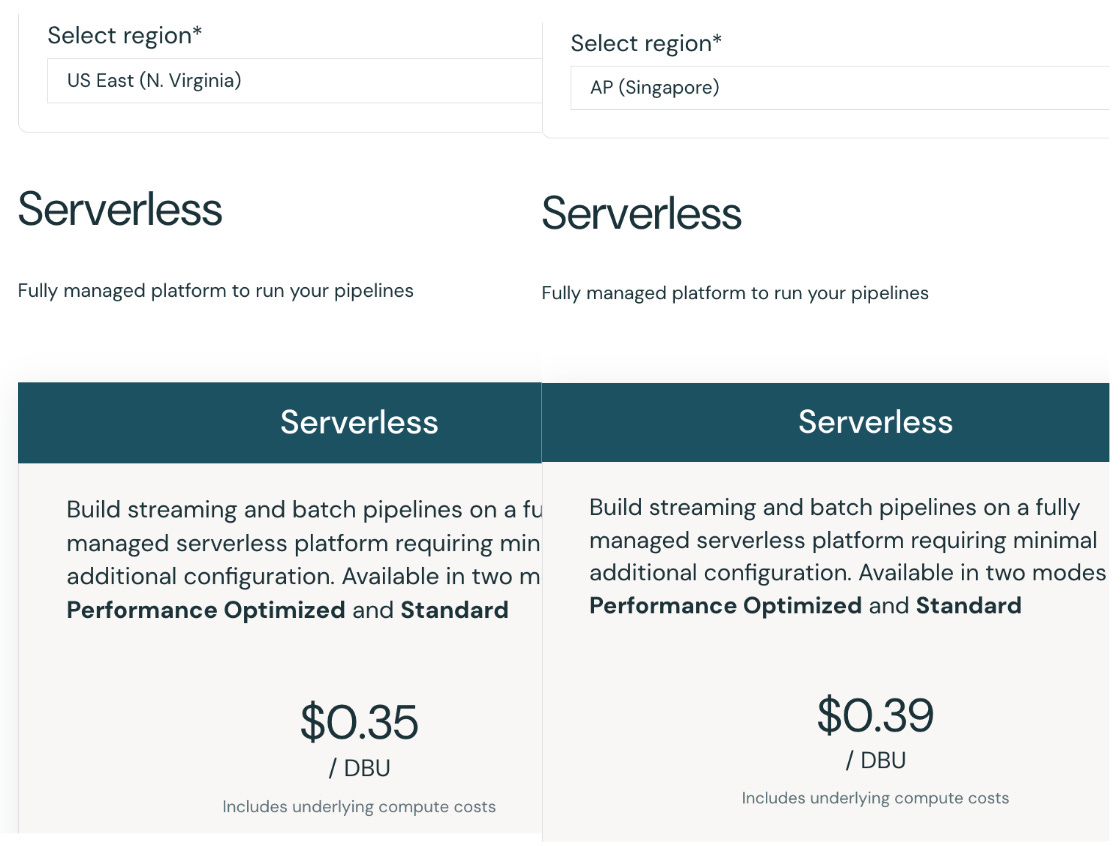
The same workload with different plans. Source. Region: Depending on the region of your instances, the DBU rate might differ for the same instance type when it lives in different regions.
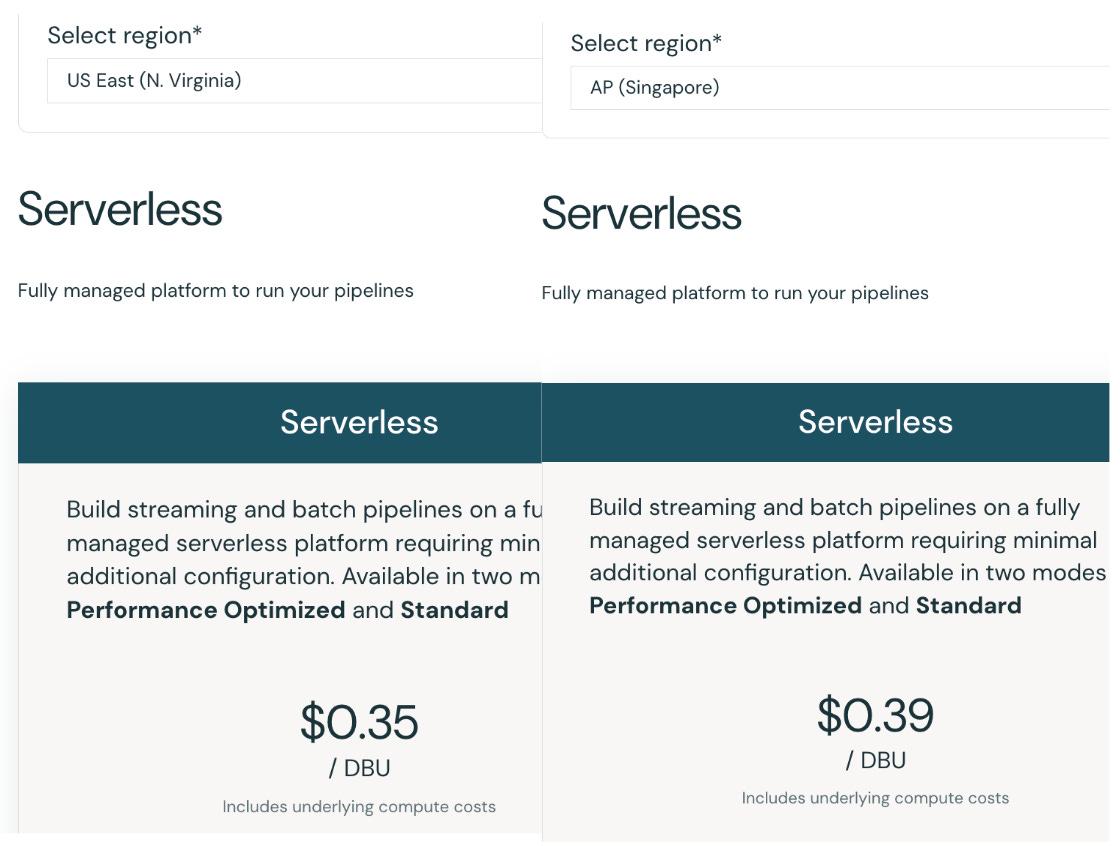
The same workload with different regions. Source. Commitment: When you commit to using Databricks at certain levels of usage, you will get a lower DBU rate. The discount increases if you reserve more capacity.
However, the DBU cost does not cover the whole Databricks compute cost. You will need to pay for your cloud provider for the usage of the virtual machines.
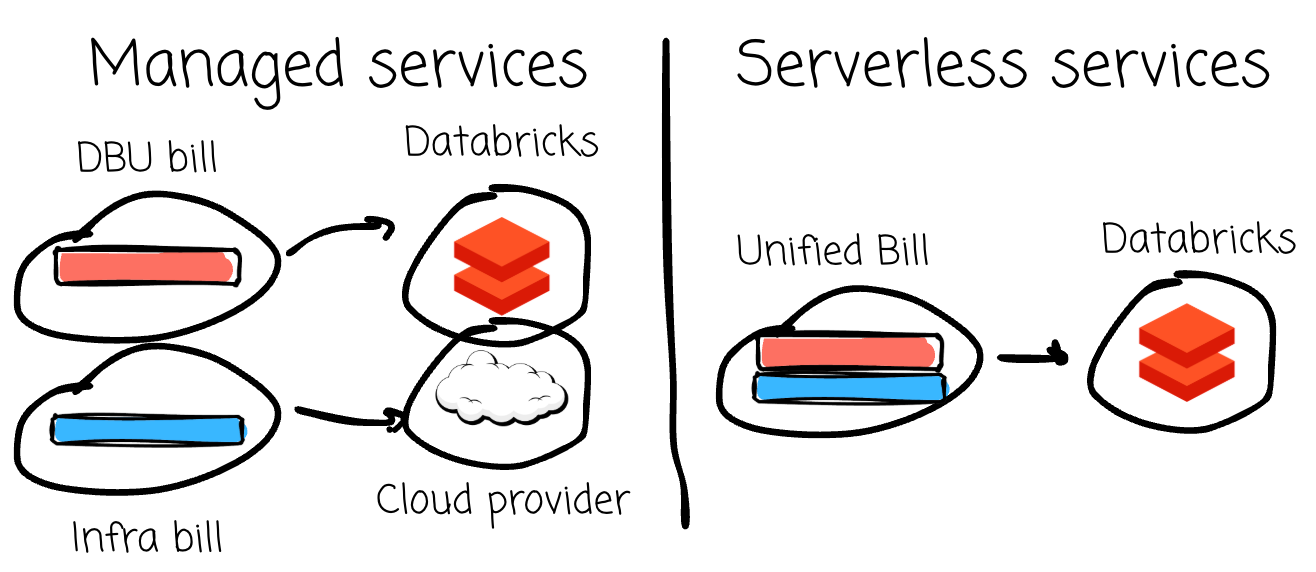
If you choose the Serverless compute type, you don’t need to pay this extra infrastructure cost to the cloud provider, as Databricks already includes it in the DBU rate for the serverless offering.
Here is an example of the compute cost estimation of a Databricks setup. All the details are retrieved from the Databricks pricing calculator. For simplicity, we will skip the auto scaling factor here.
DBU rate: You subscribe to the Premium Plan, AWS cloud provider, SQL Pro Compute compute type, and US East region. Each DBU will cost you: 0.55$/hr
Number of consumed DBUs: You choose 3 X-Small instances; each has a capacity of 6 DBU/hour. You use these three instances for 5 hours a day, 30 days a week. The total consumed DBUs are:
2700 = 3 (instances) * 6 (instance’s capacity) * 5 (hours a day) * 30 (days a week)The DBUs cost will be:
1485$ = 2700 (The number of consumed DBUs) * 0.55 (The rate of a DBU)However, this is not done yet, as you need to include the cloud provider infrastructure cost of your instances:
1485$ (DBU cost) + (A * 3) (instanace cost)
A is the X-Small instance's cost on AWS, as I can't find the exact number online.
Storage
For Databricks storage costs, you pay for data stored and for operations executed in the cloud provider's object storage. You can tell Databricks to create a new object storage bucket or use an existing bucket.
The rate varies by cloud provider. For example, AWS S3 standard charges you $0.023 per GB per month. For write-related requests (PUT, COPY, POST, LIST), it is $0.005 per 1000 requests; for read-related requests (GET or SELECT), it is $0.004 per 1000 requests.
In a month, if you store 100 GB of Databricks data in S3, issue 200 PUT requests and 100 GET requests, the total cost will be:
3.7$ = 100 * 0.023 + 200 * 0.005 + 100 * 0.004The storage cost might vary if:
You offload your data to lower-tier storage after a period of time.
Additional cost will be added if where you run the compute, and your data is in different zones or different clouds.
The transfer cost might change if you use advanced network settings such as VPC endpoints on AWS, Private Link, or Service Endpoints on Azure, or Private Google Access (PGA) on GCP.
In 2024, Databricks introduced the Default Storage feature, which provides configured storage, security policy, and Unity Catalog. Together with serverless compute offerings, Databricks aims to help users get started more quickly without the friction of self-managed infrastructure.
Default Storage usage is measured by a standardized unit called DSU. The DSU rate varies by region, storage type, data volume, or number of transactions. For the AWS cloud provider, the premium plan in the US East Region has a DSU rate of $0.023.
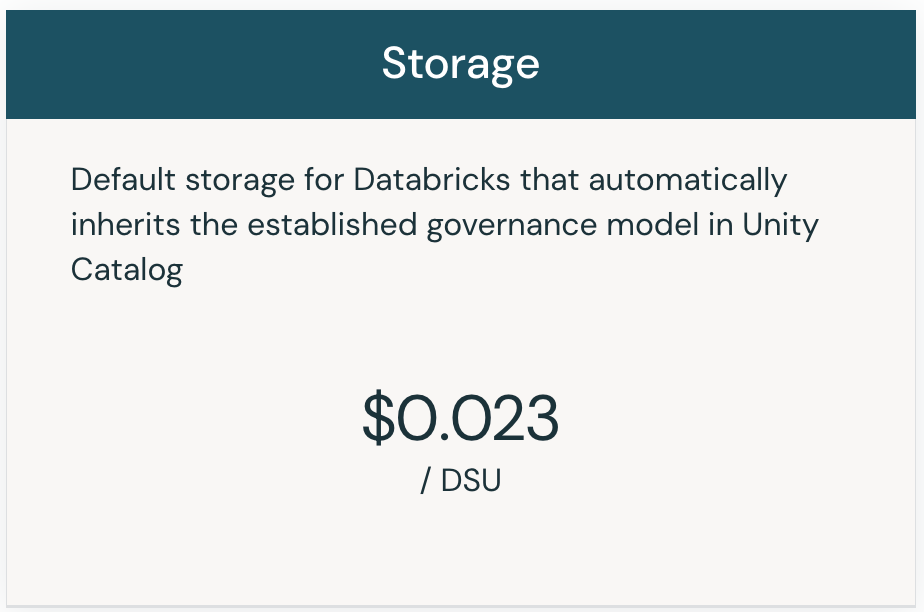
When translating the Default Storage usage to DSU usages, we can refer to the official Databricks pricing calculator:
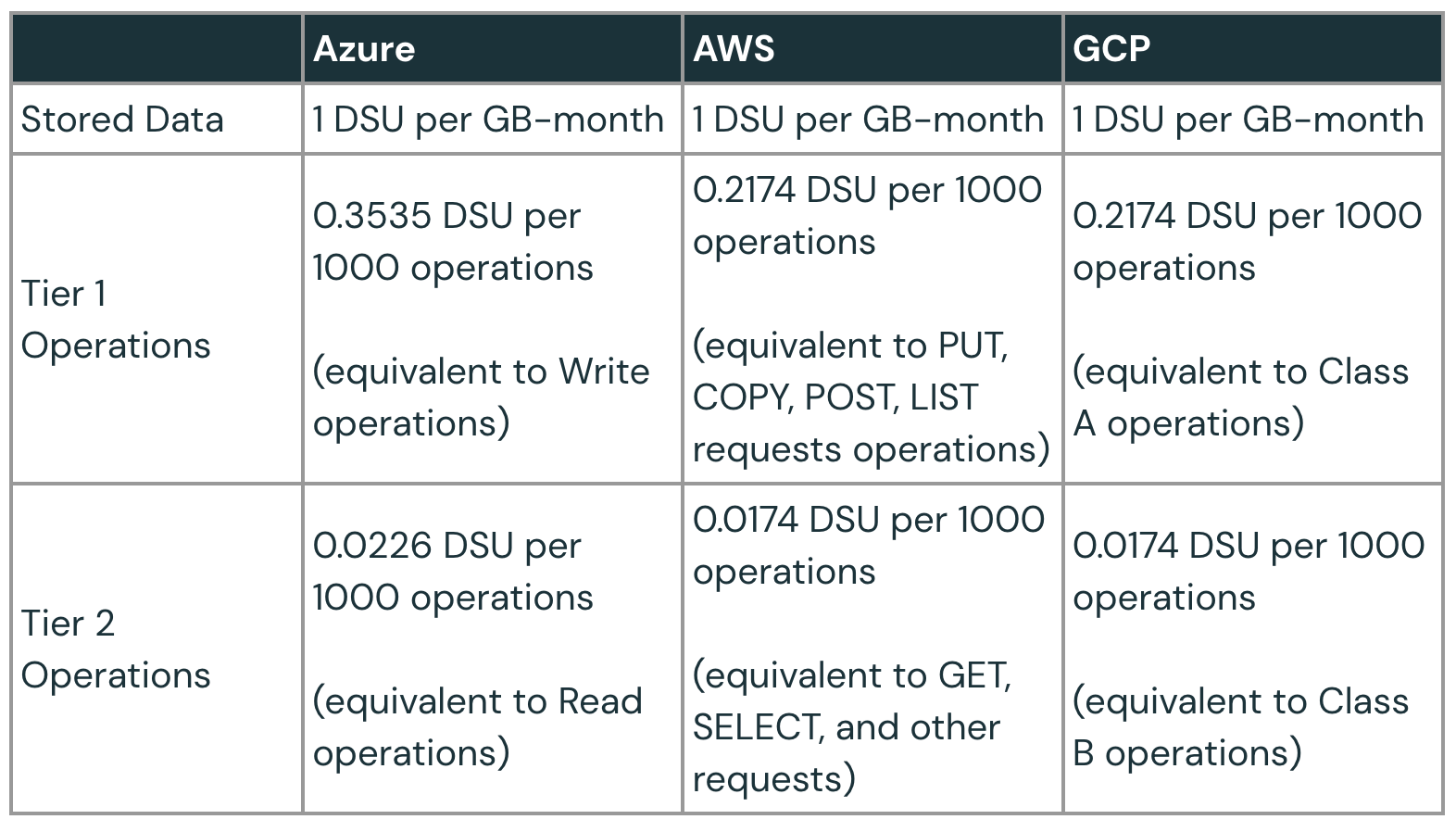
As you can see, Default Storage billing also charges you based on the stored data volume, the number of requests (write and read), and network transfer costs if you run the compute in a different zone or a different cloud.
Snowflake
Compute
Snowflake introduces the concept of credit, which is the primary unit of measure for computing resource consumption. Credits are billed per second, with a 60-second minimum.
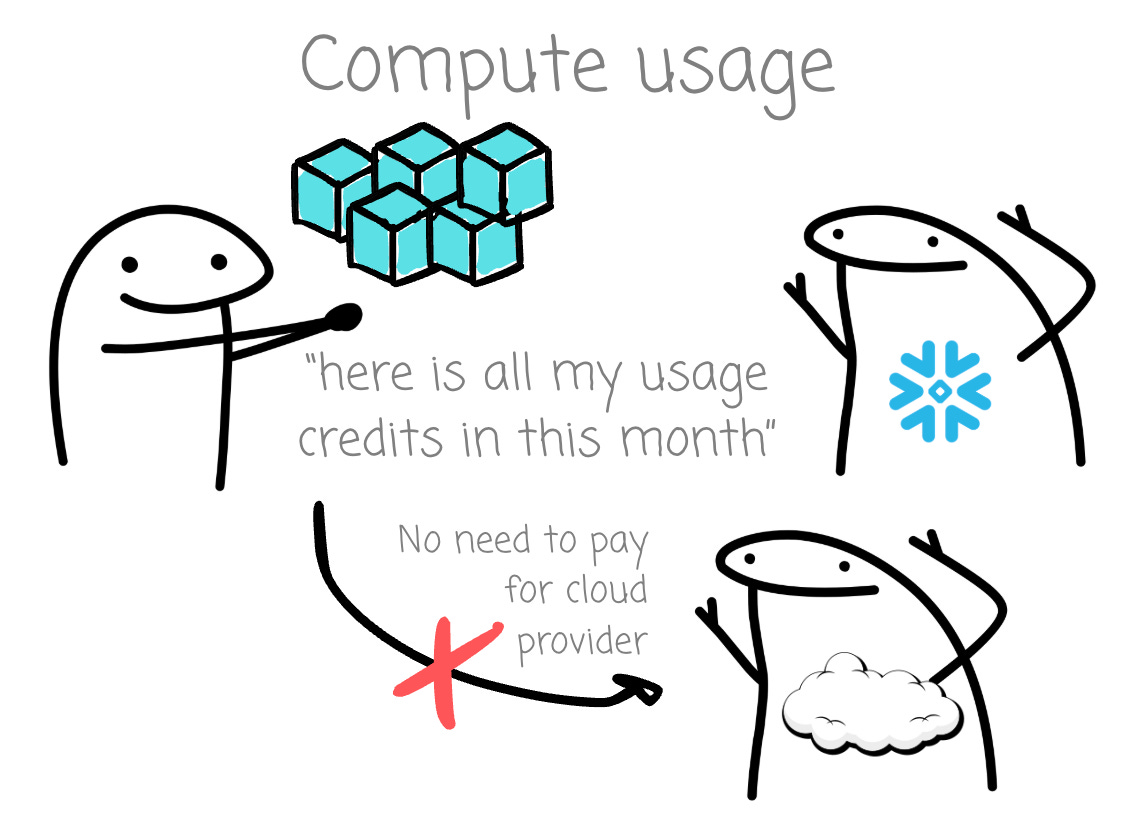
The compute billing is calculated by:
Compute cost = Number of consumed credit * credit rateUnlike Databricks, users only need to pay for Snowflake, not the cloud provider. The Compute cost is broken down into smaller components.
I invite you to join my paid membership list to read this writing and 150+ high-quality data engineering articles:
If that price isn’t affordable for you, check this 30% ANNUAL DISCOUNT
If you’re a student with an education email, use this 50% ANNUAL DISCOUNT
You can also claim this post for free (one post only).
